Conversion rate optimization tools: choose by the job you need done
Conversion rate optimization (CRO) tools help more of your visitors buy, sign up or get in touch. They are not one kind of software. Most do one job: measure where people drop, show why they drop, decide what to change first, or ask visitors what they think. Pick the job you need first. If you do not yet know where people leave, start there.
Start free. No card needed. Plans and limits are on the pricing page.
Check your site free first: an SEO audit of up to 16 pages, no account.
The jobs conversion rate optimization tools do
| Job | The question it answers | Kind of tool | Convertlyft |
|---|---|---|---|
| Measure | Where do people drop? | Web analytics with funnels | Yes: funnel analysis of up to 6 steps, every visit counted |
| Diagnose | Why did they drop? | Behavior analytics: replays, heatmaps, errors, page speed. Contentsquare, which now runs Hotjar,[1] and Microsoft Clarity[2] are examples | Yes: recordings (see session replay tools), heatmaps, stuck spots, JavaScript errors and Core Web Vitals from real visits |
| Decide | What should I change first? | Usually a person: an analyst or a CRO consultant | Yes: What to do names one change at a time, with the numbers behind it |
| Survey | What do visitors say? | Surveys, polls and interviews. Contentsquare’s free plan includes basic surveys[3] | No. Convertlyft has no surveys |
Compared in detail: Hotjar alternative, Microsoft Clarity alternative.
Which job to start with
Measure first. A survey or a redesign aimed at the wrong step costs time and teaches you little. Once you know the step that loses the most people, diagnose it: watch the visits at that step, read the page’s heatmap and errors, and check how fast it loads for real visitors. Then change one thing and measure the same step again.
Surveys and replays answer different questions. A survey tells you what people say. A replay shows what they did. If you need both, you need two kinds of tool.
Where Convertlyft fits: measure, diagnose, decide, check
- Measure. Funnels of up to 6 steps, counted in order. The step that lost the most people is marked in amber. Compare with the period before, see one device at a time, or export the steps as CSV. Traffic shows visits by entry channel and campaign tags.
- Diagnose. Every visit is recorded, on every plan (up to a safety limit of 50,000 new recordings per site per day), and funnel steps link to the recorded visits that reached them. Heatmaps show all, rage, dead, error and first clicks, plus a scroll map. Stuck spots list clicks where nothing happened and clicks made again and again. JavaScript errors are grouped into issues, each with the visits that hit it. Core Web Vitals (LCP, INP and CLS, with FCP and TTFB) come from real visits.
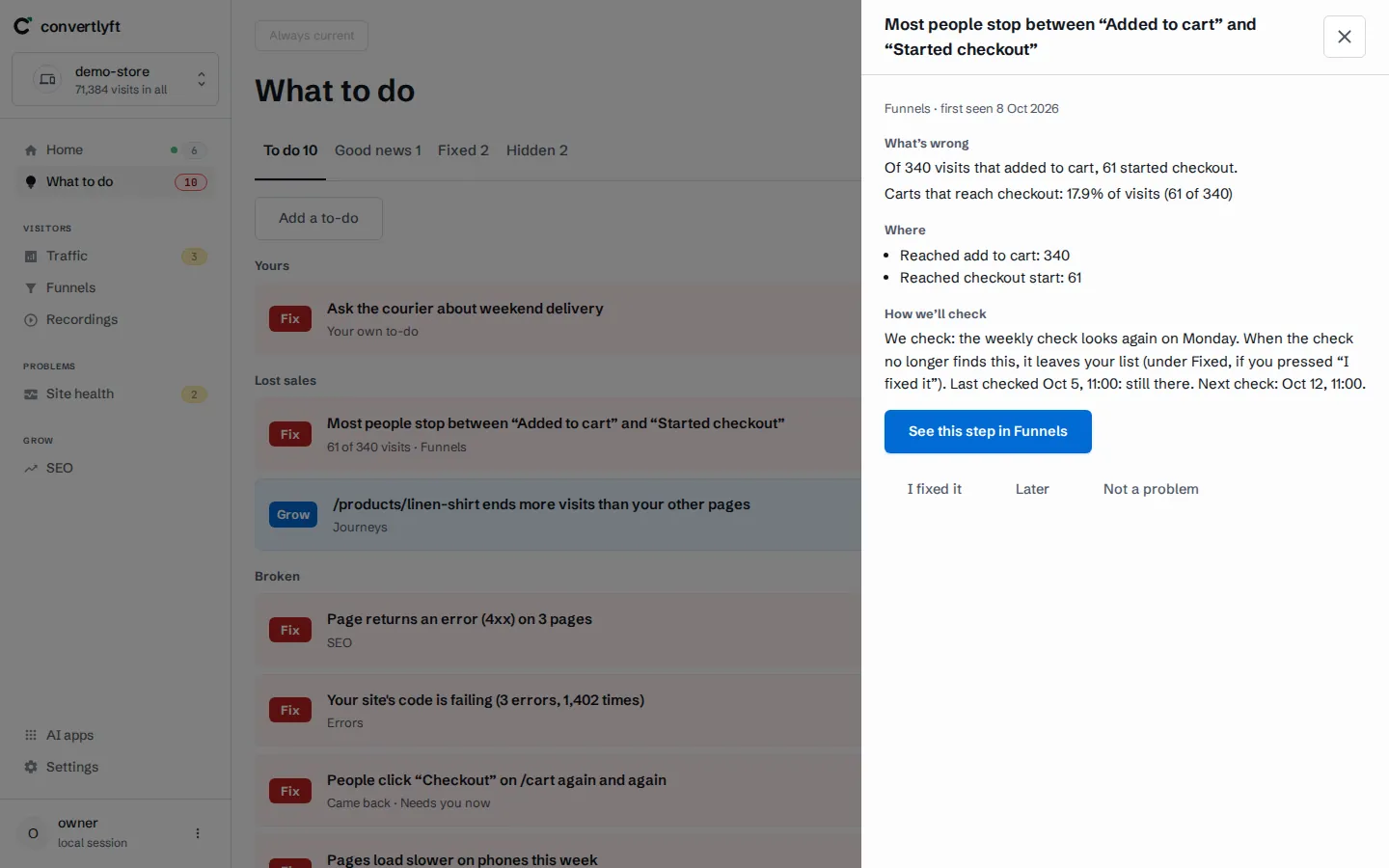
- Decide. What to do lists to-dos, each with the measurement behind it and one change to make where there is one. The Monday report arrives at 07:30 in your site’s time zone.
- Check. You make the change: you, your developer or your AI tool. Then press I fixed it; the next check marks it Confirmed fixed or Came back.
Your AI tools can read the same numbers: Convertlyft is an MCP server at https://mcp.convertlyft.com/mcp. For a JavaScript error, Copy for your developer gives a write-up, and Fix it with your AI hands it to the AI app you connect. More on how Convertlyft works.
What Convertlyft does not do
- No surveys, polls or interviews. Convertlyft reads what people do on your site. It does not ask them questions.
- No mobile app recordings. It records websites only.
- No change without you. It names the change and checks whether it held. You, your developer or your AI tool make it.
Questions to ask any CRO tool before you choose
- Does it count every visit, or a sample?
- Does each number link to the visits behind it?
- Does it tell you what to change first, or leave that to you?
- How long does it keep recordings and data?
- What happens to the price as your traffic grows?
- Can your AI tools read it?
For Convertlyft: every visit is counted; funnel steps, errors and stuck spots link to their visits; replays are kept 90 days and what visitors did 24 months; going over your visits never stops tracking; and an MCP server is included on every plan.
What it costs
Convertlyft is free up to 5,000 visits a month, with every feature, and no feature is held back for a bigger plan. See the pricing page. Weighing a consultant instead? See our CRO consultant alternative.
Questions
What is a CRO tool?
Software that helps more visitors take the action you want, such as buying, signing up or getting in touch. Most CRO tools do one job: measure, diagnose, decide or survey.
How do I get more of my visitors to buy or sign up?
Find the step that loses the most people, find out why by watching the visits at that step and reading its heatmap and errors, change one thing, then measure the same step again.
Does Convertlyft run surveys?
No. Convertlyft reads what people do on your site; it does not ask them questions.
Is Convertlyft a replacement for a CRO consultant?
It does a narrower job: it reads your numbers, names what leaked, and names one change for you to make. For a full redesign, brand and positioning work, or research with real customers, hire a consultant.
How much does Convertlyft cost?
Free up to 5,000 visits a month, with every feature. The plans above that are on the pricing page.
Sources
- Contentsquare, “Hotjar is now part of Contentsquare”, contentsquare.com/hotjar, as of 22 October 2026.
- Microsoft Learn, “Clarity FAQ”, learn.microsoft.com/en-us/clarity/faq, as of 22 October 2026.
- Contentsquare, pricing, contentsquare.com/pricing, as of 22 October 2026.
Start free
Measure, diagnose and decide from one line of code, then check whether the change held.
Start free. No card needed.