Search Console report: your Google searches beside your visits
See which searches bring people to your site.
Start free. No card needed. Plans and limits are on the pricing page.
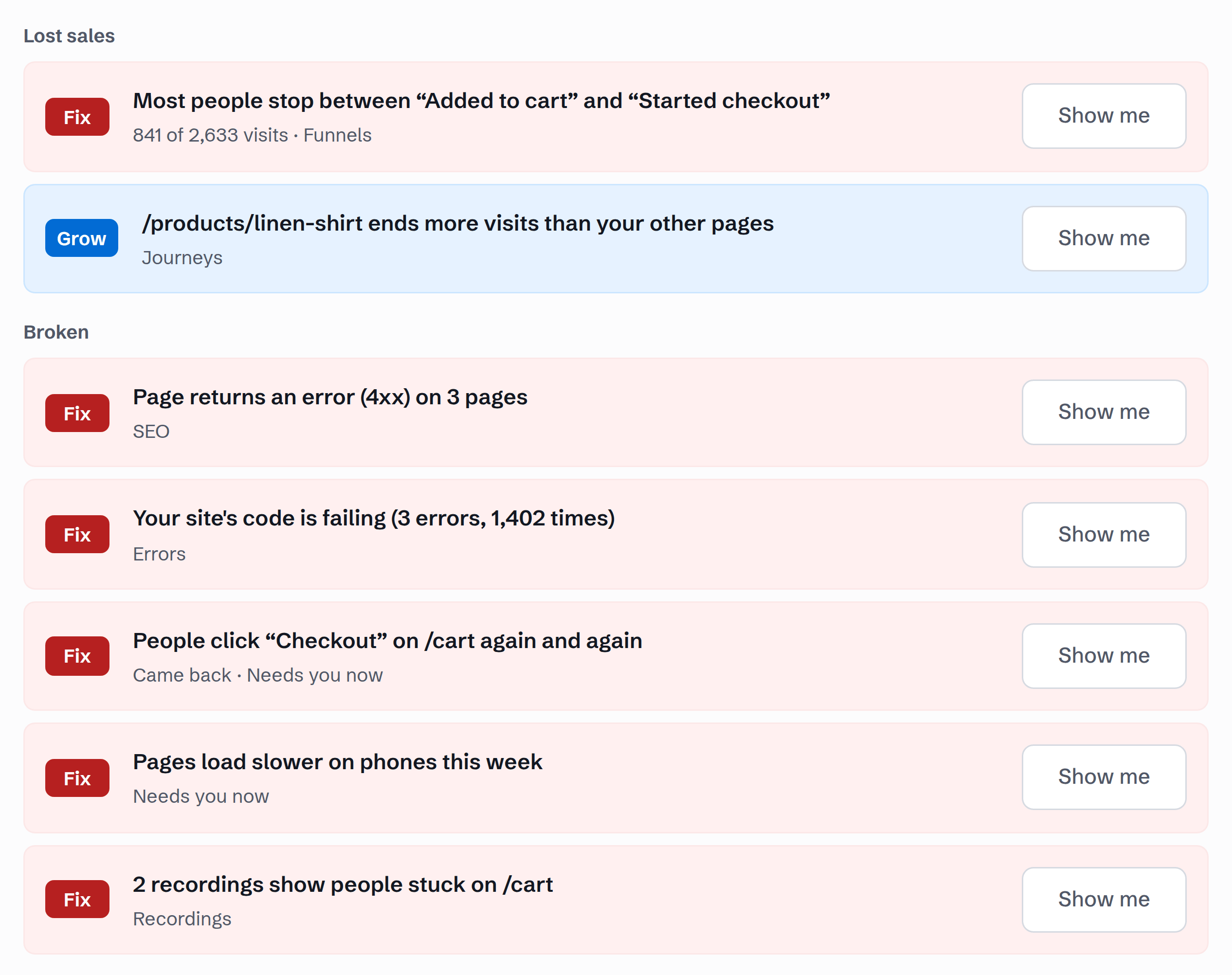
From a search to the change to make
What to do lists to-dos, each with the measurement behind it and one change to make where there is one. Each to-do names one change, with the numbers behind it. When you have made the change, press I fixed it; the next check marks it Confirmed fixed or Came back.
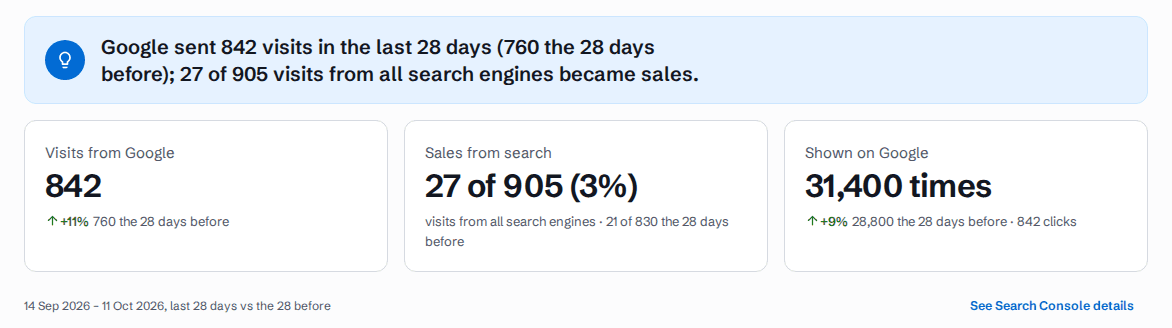
Google’s numbers beside yours
Google Search Console counts how often Google showed your pages and how often people clicked. Convertlyft reads those numbers once you connect it, and puts them beside the visits our tag counts and the sales and inquiries those visits led to. Google’s clicks and our visits are two counters, never added together.
The SEO room’s Overview opens on Visits from Google and Shown on Google, both from Search Console, the last 28 days against the 28 before. Beside them, Sales from search: the visits from all search engines that became sales, counted by our tag.
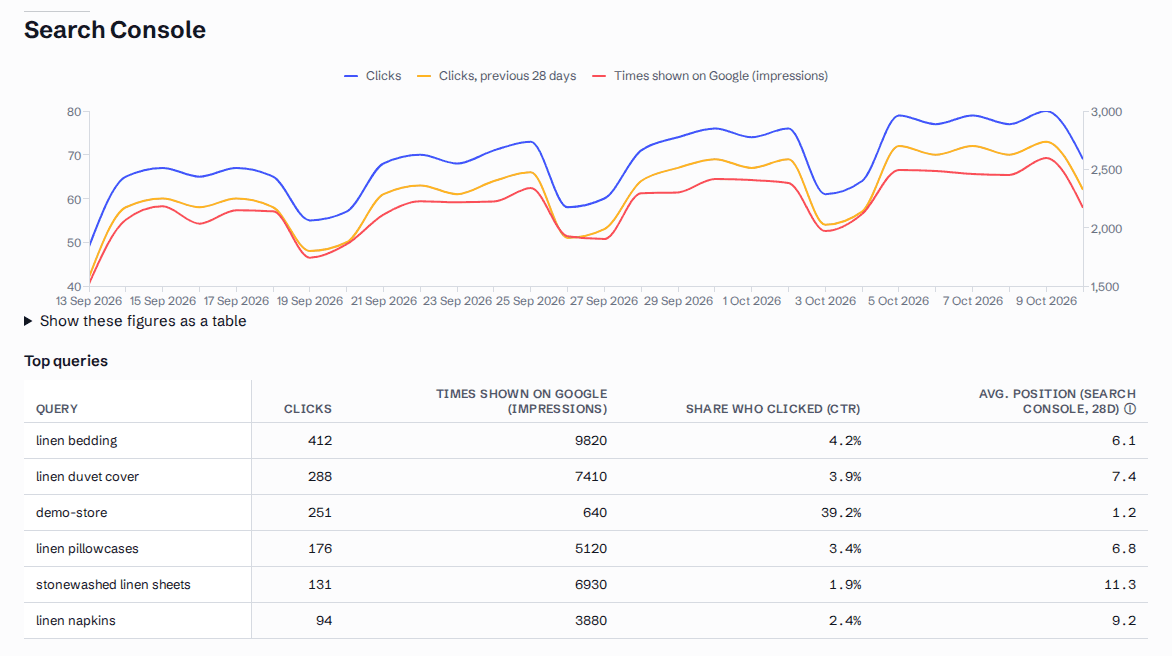
What the Search Console report shows
- Clicks by day. Google’s clicks for each day, against the 28 days before, with the times shown on Google. The same figures open as a table.
- Top queries. The searches that brought clicks, each with its clicks, times shown on Google (impressions), share who clicked (CTR) and average position.
- Your next 3 moves. One move per page, from Search Console and our tag, for example a page that fell on Google, or a search close to page 1. Ranked by how often Google shows the page and how often it turns visits into sales or inquiries.
- Rankings. The Search Console position beside each search you follow.
- Content briefs. Searches to win: a page’s top 5 searches from Search Console, your own brand left out.
How to get a Search Console report, step by step
Start free. No card needed.
Add the line of code. We spot Shopify, WordPress, Wix, Squarespace, Webflow, Framer, Next.js or a tag manager and show the steps.
In SEO, connect Search Console and choose your site’s property.
Open SEO. The Overview shows Google’s numbers beside your visits; See Search Console details opens clicks by day and the top queries.
How Search Console connects
Search Console connects through our connection partner. You sign in with Google directly; we never see or store your Google password or tokens. It is read-only, unless you choose to submit your sitemap to Google from the SEO room. Google’s numbers arrive a few days late, so each figure says which days it covers.
Your AI tools can read it too
Convertlyft is an MCP server at https://mcp.convertlyft.com/mcp. A connected AI app can read the searches Google showed your site for and the pages that got them, over the last 28 days. Connect your AI →
What it costs
Convertlyft is free up to 5,000 visits a month, with every feature. The full table of plans is on the pricing page. Your new account starts on Pro at 10,000 visits a month, free for 14 days. No card needed. See the SEO room on demo data →
Check your site free first: an SEO audit of up to 25 pages, no account.
Questions
What is a Search Console report?
Google Search Console counts how often Google showed your pages in its results, how often people clicked, and the average position. A Search Console report puts those numbers in one place: by day, by search and by page.
What does Convertlyft add to Search Console?
The visits our tag counts and the sales and inquiries those visits led to, beside Google’s clicks and times shown. The two are kept as two counters, never added together.
Can Convertlyft change anything in my Search Console?
No. The connection is read-only, unless you choose to submit your sitemap to Google from the SEO room.
Do you store my Google password?
No. Search Console connects through our connection partner. You sign in with Google directly; we never see or store your Google password or tokens.
How much does Convertlyft cost?
Free up to 5,000 visits a month, with every feature. The plans above that are on the pricing page.
Start on Pro, free for 14 days
Your new account gets 10,000 visits a month, no card needed. After 14 days it moves to Free, up to 5,000 visits a month with every feature, unless you choose Pro.